
Demo
Team Context
This tool was developed for Out Of Bounce, our first Unreal Engine project after transitioning from Unity. As the project’s Programming Lead, I wanted the team to have one consistent way of assigning dependencies between components on the same actor. Without a shared workflow, these references could be set up in several different ways, such as Construction Script or BeginPlay injection, initializer functions, component tags, or class-based searches. Since the team was still getting used to Unreal, I wanted a workflow that was easy to understand and could be used consistently across the project. Coming from Unity, we were used to assigning references directly through the Inspector. I built the Component Selector to provide a similar experience while still matching Unreal’s Details panel workflow. The goal was to create one clear place for configuring internal component dependencies.
Responsibilities
Get Unified Dependency Workflow
Target is Responsibility
Designed and implemented a single entry point for assigning dependencies between components on the same actor. The workflow keeps dependencies visible alongside the rest of the component’s configuration, making actor setups easier for the team to understand and maintain.
Intuitive, Type-Filtered Selection
Built a Details panel selector that only shows component instances matching the property’s class restrictions. The selector follows workflows already used in Unreal, making it understandable without requiring the user to learn a completely new way of assigning references.
System Overview
The Component Selector separates dependency assignment from dependency resolution. In the editor, a custom Details panel field finds compatible components on the owning actor and displays them in a dropdown. The selected component is stored by name. At runtime, the expected component type is resolved and caches the resolved component for later use.
High-Level Architecture
Editor Discovery Flow
Runtime Resolution Flow
Before / After

System Breakdown
Exact Instance Selection
Class Filtering
Typed Runtime Resolution
Problem
Component queries such as GetComponentByClass() work well when an actor only has one matching component.
If an actor has multiple components of the same class, the query cannot know which specific component should be used.
Solution
The Component Selector lets the user choose the exact component instance from the Details panel instead of relying on the first matching component. This also prevents typing mistakes by using a plain text field.
Implementation
Property Declaration
C++
Component Dropdown
Details Panel


The editor customization reads Blueprint components from the Simple Construction Script and native components from the actor class default object.
Result
The actor can contain multiple components of the same type while still clearly defining which one is used for each dependency.
User Workflow
A typical user-facing setup follows this flow:
Add the Components
Add the components the actor needs, including multiple components of the same class where necessary.

Declare the Dependency (+ Filtering)
Add an FComponentSelector property and optional AllowedClasses to define which types should appear.

Select the Component
Choose the exact component from the dropdown.

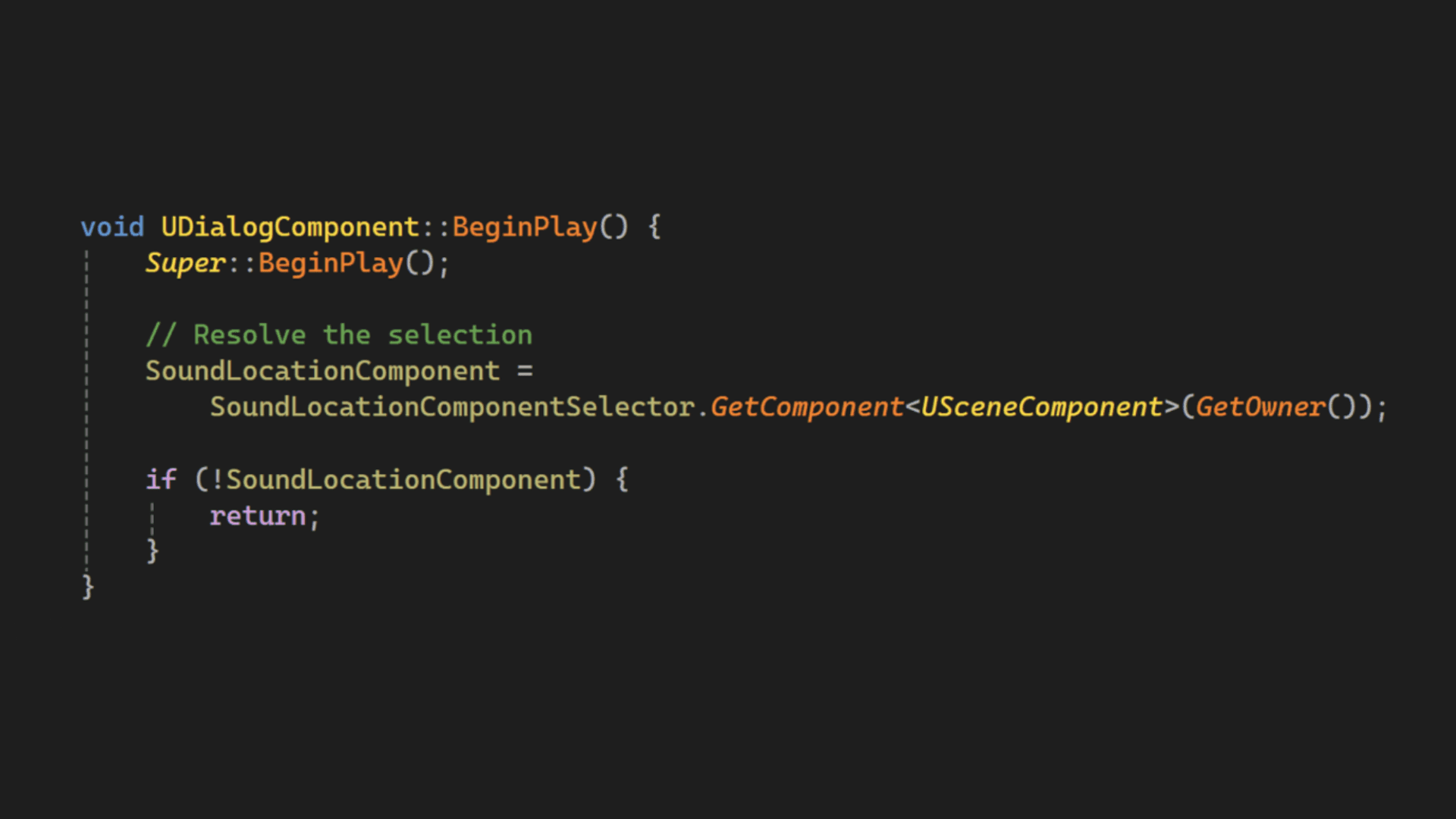
Resolve the Selection
Request and cache the selected component in C++.
Blueprint and Native Components
The selector needed to find components added through the Blueprint editor as well as components created directly in C++.
Challenge
Blueprint Inheritance
Components can also come from parent Blueprint classes, so the selector had to search through the class hierarchy instead of only checking the current Blueprint.
Challenge
Editor and Runtime Consistency
The component shown in the dropdown needs to be the same component that is found later at runtime.
Challenge
Name-Based References
Storing the component name keeps the runtime lookup simple, but the reference can break when the selected component is renamed.
Tradeoff
Simple Runtime API vs Editor Code
The gameplay-facing API is small, but supporting the dropdown requires additional editor customization code.
Tradeoff
Blueprint vs Instance
The current version works for assigning dependencies on the Blueprint class, but it does not yet support selecting a different component on each placed actor instance.
Tradeoff
Impact
Made actor setups easier for the team to understand while transitioning from Unity to Unreal.
Created one shared workflow for assigning internal component dependencies.
Kept dependencies visible next to the rest of the component’s configuration.
What I Learned
Having several working ways to solve the same problem can make a project harder to understand if the team does not use one shared workflow.
Familiar editor interactions make new tools easier for a team to understand and use.
What I Would Improve
Improve how the selection is stored so renaming a component does not break the reference.
Add support for selecting a different component on each placed actor instance.
Clearly show whether the selected component is inherited from the Blueprint class or has been changed on the placed actor instance.
Show a clear warning when the selected component was deleted, renamed, or no longer matches the expected component type.